Introduction
One of the coolest features of AMD’s Ryzen desktop CPUs, and historically a great reason to get them over the competition, was the official support for error-corrected memory (ECC RAM)1. With most Ryzen 1000 through 5000 series CPUs and the right motherboards, ordinary users could get ECC RAM going without having to spring for more expensive workstation-grade CPUs.
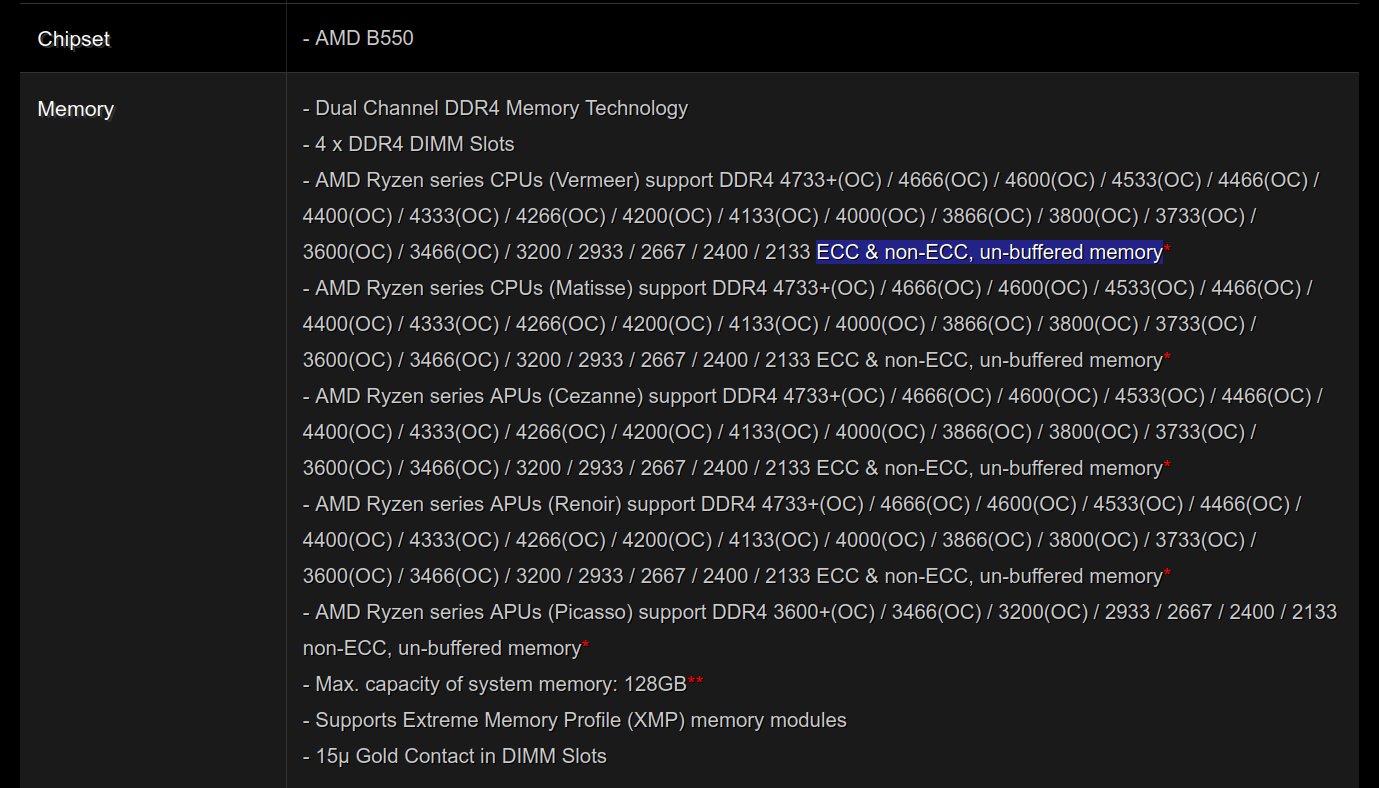
For example, here’s the specification page for the ASRock B550 Steel Legend motherboard. This is a mainstream “B” series motherboard which lists detailed compatibility information for ECC RAM by processor generation.
(To my knowledge ASRock has had the best support for ECC RAM in Ryzen motherboards, and I’ve been very happy with their motherboards in general.)
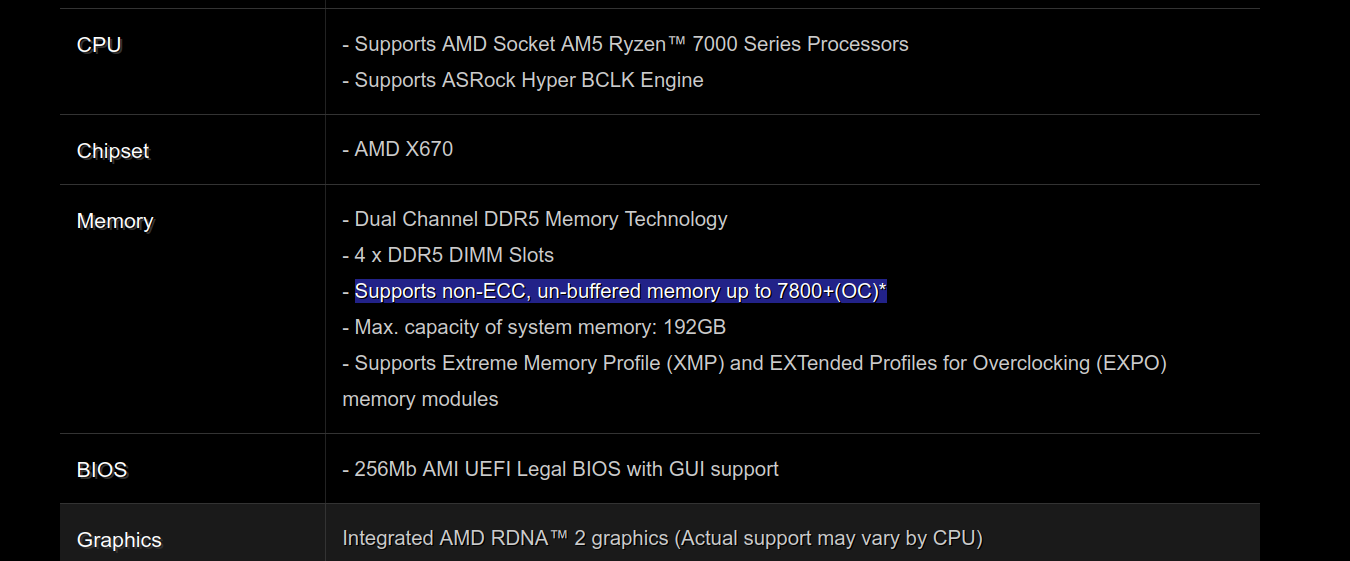
Unfortunately, when the AMD Ryzen 7000 “Raphael” CPUs were launched along with the brand new Socket AM5, all mention of ECC support was gone. The specification page for the ASRock X670E Taichi, one of the most expensive AM5 motherboards you can buy, has no mention of ECC support as of the date of writing this.
I still decided to upgrade to a Ryzen 7950X, and overall I’ve been happy with the performance of the new processor. But the lack of ECC was a huge bummer at the time of purchasing my system.
Finding a forum link
A couple months ago I came across a topic on the ASRock forums talking about ECC support on AM5 motherboards, in which a user called ApplesOfEpicness said that they’d worked with an AMD engineer to get ECC RAM going within AMD’s AGESA firmware. They’d claimed to have tested it on an ASRock motherboard with an updated UEFI, by shorting ground and data pins, and seeing errors be reported up to the OS.
I was intrigued by this! Even though I didn’t have the same motherboard that ApplesOfEpicness did, I had chosen an ASRock board (the B650E PG Riptide)—I had figured that if ECC was possible on any AM5 board at all, it would be supported on ASRock. So based on the forum post, last week I ordered a pair of 32 GB server-grade ECC sticks from v-color.
I updated my motherboard’s UEFI to the latest version (version 1.28 with AGESA 1.0.0.7b), and then replaced my existing RAM with the new sticks. I started up the system, and after a very long link training process2… it booted up!
Does the OS recognize ECC?
On the Linux side, all indications were that the ECC memory was functioning correctly. sudo dmidecode -t memory reported:
% sudo dmidecode -t memory
Physical Memory Array
	Location: System Board Or Motherboard
	Use: System Memory
	Error Correction Type: Multi-bit ECC

... <snip> ...

Handle 0x0033, DMI type 17, 92 bytes
Memory Device
        Array Handle: 0x002E
        Error Information Handle: 0x0032
        Total Width: 72 bits
        Data Width: 64 bits
(The “Total Width” field is the important one here. For non-ECC RAM it read 64 bits, but in my case it was 72 bits because 64-bit ECC RAM has an extra 8 bits of parity data.)
Also, the Linux kernel reported that its error detection and correction subsystem, EDAC, was enabled:
% sudo dmesg | grep -i EDAC
[    0.444842] EDAC MC: Ver: 3.0.0
[   25.042690] EDAC MC0: Giving out device to module amd64_edac controller F19h_M60h: DEV 0000:00:18.3 (INTERRUPT)
[   25.042693] EDAC amd64: F19h_M60h detected (node 0).
[   25.042696] EDAC MC: UMC0 chip selects:
[   25.042697] EDAC amd64: MC: 0:     0MB 1:     0MB
[   25.042699] EDAC amd64: MC: 2: 16384MB 3: 16384MB
[   25.042702] EDAC MC: UMC1 chip selects:
[   25.042703] EDAC amd64: MC: 0:     0MB 1:     0MB
[   25.042704] EDAC amd64: MC: 2: 16384MB 3: 16384MB
Looking good so far!
Where’s this data coming from?
At this point it’s worth asking about the source of these messages. Where is the data coming from and why should we believe it?
Let’s look at dmidecode first. man dmidecode starts with:
dmidecode is a tool for dumping a computer’s DMI (some say SMBIOS) table contents in a human‐readable format. This table contains a description of the system’s hardware components, as well as other useful pieces of information such as serial numbers and BIOS revision. Thanks to this table, you can retrieve this information without having to probe for the actual hardware. While this is a good point in terms of report speed and safeness, this also makes the presented information possibly unreliable.
Oh, interesting, “possibly unreliable” is a little concerning! What is this SMBIOS thing anyway? Wikipedia says:
In computing, the System Management BIOS (SMBIOS) specification defines data structures (and access methods) that can be used to read management information produced by the BIOS of a computer. This eliminates the need for the operating system to probe hardware directly to discover what devices are present in the computer.
So the data presented by dmidecode is coming from the UEFI, not from the processor3. What this means is that the memory is ECC-capable, but not necessarily that it is active. Whether ECC is active is ultimately determined by the memory controller on the system.
Querying the memory controller
When I mentioned setting up ECC at work, Robert Mustacchi pointed me to the excellent illumos documentation about AMD’s Unified Memory Controller. I did some reading and learned that essentially, AMD processors expose a bus called the System Management Network (SMN). Among other things, this bus can be used to query and configure the AMD Unified Memory Controller (UMC).
NOTE: The information in the rest of this section is not part of the public AMD Processor Programming Reference, but can be gleaned from the source code for the open-source Linux and illumos kernels.
WARNING: Accessing the SMN directly, and especially sending write commands to it, is dangerous and can severely damage your computer. Do not write to the SMN unless you know what you’re doing.
The idea is that we can ask the UMC the question “is ECC enabled” directly, by sending a read
request over the SMN to what is called the UmcCapHi register. The exact addresses involved are a
little bit magical, but on illumos with a Ryzen 7000 processor, here’s how you would query the UMC
over the SMN bus (channel 0 and channel 1 are the two memory channels on the system, and each
channel has one of the 32GB sticks plugged into it.)
# Query the UMC at address 0x50df4, representing channel 0
$ pfexec /usr/lib/usmn -d /devices/pseudo/amdzen@0/usmn@2:usmn.0 0x50df4
0x50df4: 0x40000030

# Query the UMC at address 0x150df4, representing channel 1
$ pfexec /usr/lib/usmn -d /devices/pseudo/amdzen@0/usmn@2:usmn.0 0x150df4
0x150df4: 0x40000030
(pfexec is the illumos equivalent to sudo.)
Also, illumos comes with a really nice way to break up a hex value into bits:
$ mdb -e '0x40000030=j'
                1000000000000000000000000110000
                |                        ||
                |                        |+------ bit 4  mask 0x00000010
                |                        +------- bit 5  mask 0x00000020
                +-------------------------------- bit 30 mask 0x40000000
The bit we’re interested in here is bit 30. If it’s set, then ECC is enabled in the memory controller.
Accessing the SMN on Linux with the ryzen_smu driver
Can we replicate this query on Linux? Turns out we can! There’s a neat little driver called
ryzen_smu which provides access to the SMN bus. It’s easy
to download and install (though on my system I needed to apply a
patch).
The driver exposes a file called
/sys/kernel/ryzen_smu_drv/smn
which can be used to perform a query over the SMN bus. The documentation says that to perform a
query, we must write 4 bytes to the file in little-endian
format, and
then read 4 bytes from the output in little-endian format. This isn’t convenient to do via the
command line, so let’s write a small Python script:
# smn-query-ecc.py
# Licensed under CC0-1.0

def query(hex_str):
    # Convert hex string to bytes in little-endian
    decoded = int(hex_str, 16).to_bytes(4, byteorder='little')
    assert len(decoded) == 4

    # Write 4 bytes to the SMN file
    open("/sys/kernel/ryzen_smu_drv/smn", "wb").write(decoded)

    # Read 4 bytes from the SMN file, representing the return value
    ret = open("/sys/kernel/ryzen_smu_drv/smn", "rb").read(4)

    # Print ret as a hex string in little-endian order
    ret_hex_str = hex(int.from_bytes(ret, byteorder='little'))
    print(f"returned value for {hex_str} is {ret_hex_str}")

def main():
    hex_str = "0x00050df4"
    query("0x00050df4")  # channel 0
    query("0x00150df4")  # channel 1

if __name__ == '__main__':
    main()
Running this script, I got:
$ sudo python3 smn-query-ecc.py
return value for 0x00050df4 is 0x40000000
return value for 0x00150df4 is 0x40000000
Bit 30 (the first nibble’s 4) is set, which means the memory controller is reporting that ECC is
enabled.
This query should also be possible on Windows, perhaps using this tool, though I can’t vouch for it.
But is ECC really working?
The most foolproof way to test whether ECC is working is to introduce an error somehow.
- ApplesOfEpicness did so by shorting a data and ground pin on their motherboard.
- Another way would be to try and overclock the RAM until it gets to an unstable point.
I don’t quite have the courage to physically short pins, nor the patience to slowly overclock my RAM, waiting multiple minutes for DDR5 link training each time. So instead, I’m content with knowing that the memory controller is reporting that ECC is enabled.
Organically, I haven’t seen any errors so far. If a correctable or uncorrectable error does occur at some point, I’ll update this post with that information.
About those EDAC messages
Earlier in this post I’d mentioned that the Linux kernel reported that EDAC was enabled. I was curious what the data source for that was, so I dug into the Linux kernel source code.
Being generally unfamiliar with the Linux codebase, I used the tried and tested strategy of searching for strings that get logged. In this case:
- Searching for
Giving out device to moduleled me to find this line insideedac_mc_add_mc_with_groups. - This function is called here inside
init_one_instance. init_one_instanceis only called ifpvt->ops->ecc_enabledreturns true.- What is
ecc_enabled? It is set to a function calledumc_ecc_enabledin this code. Andpvt->opsis set toumc_opswhen the processor family is >= 0x17. Ryzen 7000 (Zen 4) is family 0x19.
Going by just the name, umc_ecc_enabled sounds like it would be querying the UMC. So let’s look at what it does. It looks like it’s checking that umc_cap_hi’s UMC_ECC_ENABLED bit is set.
And what is UMC_ECC_ENABLED? It’s bit 30!
So it looks like the EDAC messages are only shown if the UMC reports that ECC is enabled. This
means that, at least on AMD processors, the Linux kernel message EDAC MC0: Giving out device to module amd64_edac is a reliable indicator that ECC is enabled.
Conclusion
ECC RAM is great, and you can easily get it working on Ryzen 7000 desktop CPUs, at least with ASRock motherboards. I learned a ton of low-level processor interface details along the way.
Acknowledgements
Thanks again to Robert for teaching me about a lot of the details here!
-
While ECC RAM is probably overkill for most desktop users and I don’t have it in my gaming PC, I’ve seen enough random bit flips on servers to know that I would like to have ECC RAM in the computer I depend on for my livelihood. ↩︎
-
The internet is replete with complaints about slow Zen 4 boot times—these is in part due to DDR5 link training, which is a very slow process. With my system, link training almost three minutes for just 64 GB of RAM. Thankfully, at least on Ryzen 7000 desktops, it only needs to be done once after replacing RAM or changing timings. The UEFI caches the results of link training and reuses those values on subsequent boots. ↩︎
-
There’s some nuance here: some information like the memory speed does come from the memory controller. The ECC information, however, comes from the UEFI. ↩︎